

Features of our Road Trip Planner App
New Roads is an AI-powered road trip planner app that helps drivers plan bespoke road trips around their car, driving style, preferences, route type, trip length and appetite for adventure.
It takes the faff out of planning and puts the focus back where it belongs – on the drive. Tell New Roads what you drive, where you’re starting, what kind of roads you fancy and how long you’ve got. New Roads then builds a trip around you, combining AI with carefully chosen road, route and travel data, shaped by three decades of real-world road trip planning experience.
Here’s how it works:
AI Chat
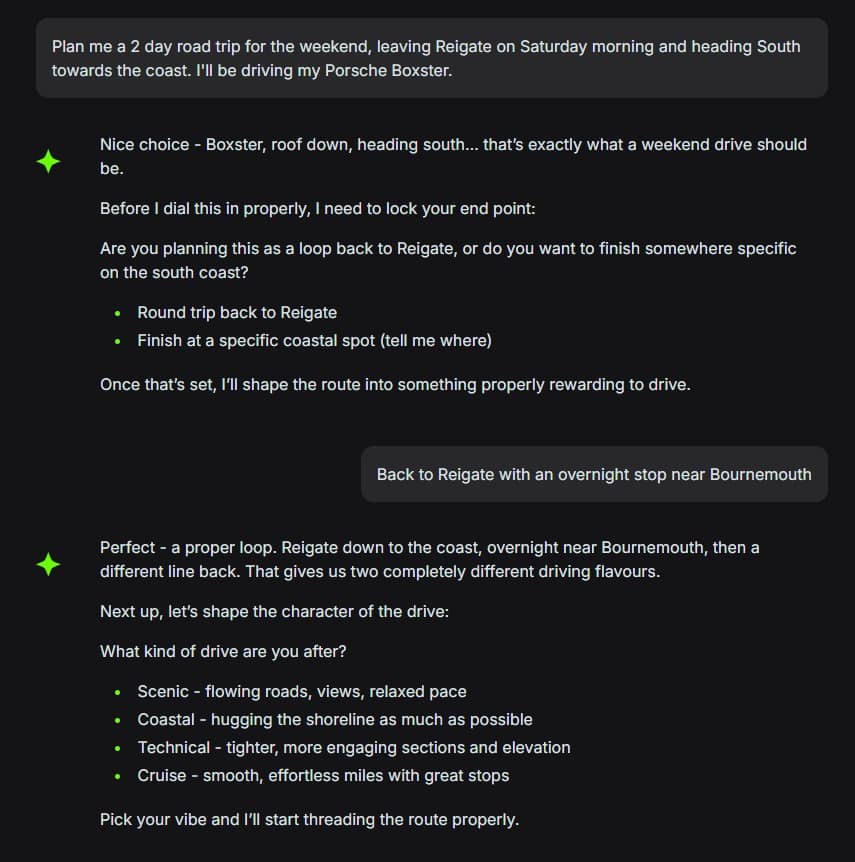
No forms. No fiddly filters. Just a conversation.
New Roads lets you plan your next road trip the way you’d talk to a mate who knows the good roads. Tell the chat what you drive, where you’re starting, where you want to end up, how long you’ve got and what sort of drive you fancy.
The more you tell it, the better the trip gets. Want coastal roads and a good lunch stop? A quick Sunday loop that starts and ends at home? A proper few days away with great driving roads, decent hotels and places worth stopping for? Just say it naturally.
New Roads can build trips around your car, your time, your route type and your preferences. Start anywhere. Finish anywhere. Make it relaxed, technical, scenic or a bit of everything.
Once your trip is built, you can review the route, stops and itinerary. If something does not look quite right, just ask the chat to change it. Add a lunch stop, avoid a certain road, shorten the day or make it more technical.
Less time planning, more time driving.
Itinerary Generation
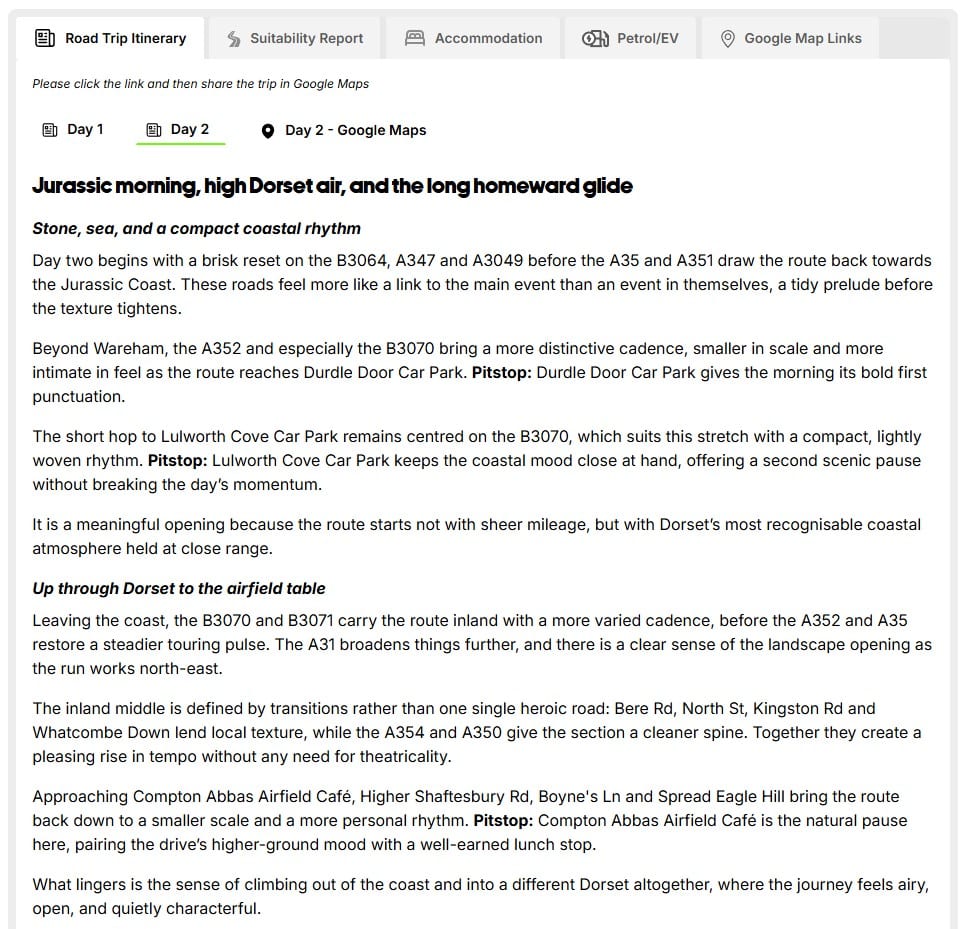
New Roads does more than drop a few pins on a map.
It builds each itinerary from scratch around your car, your time and the kind of drive you want. The route can include roads worth driving, useful stopovers, accommodation suggestions, fuel or EV charging stops (where supported) and places to break up the journey.
You can start with a simple idea or a proper brief. Either way, New Roads turns it into a trip you can review, tweak and save.
The result is not just a route from A to B. It is a plan for the whole drive – shaped around why you’re getting behind the wheel in the first place.
My Garage
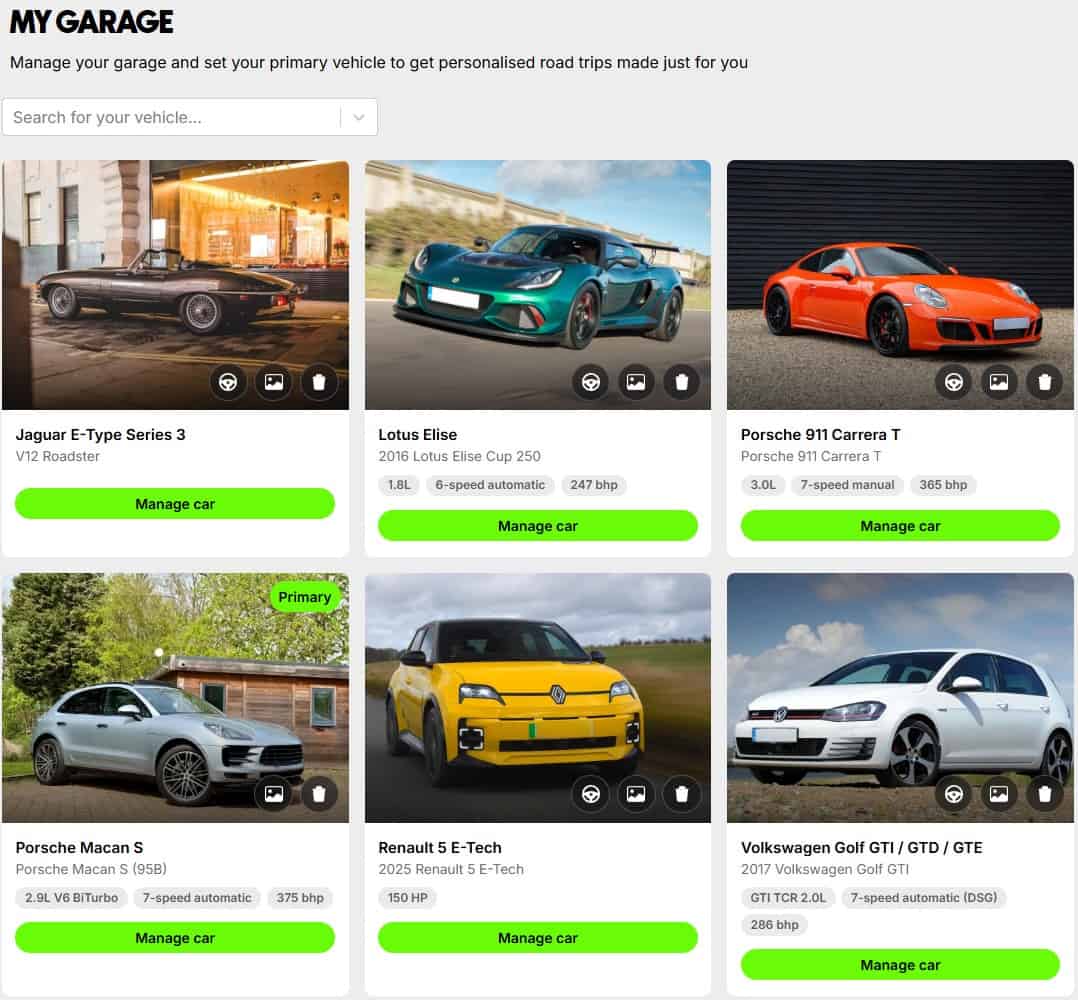
Your car changes the route.
With My Garage, you can add the vehicles you drive and let New Roads plan with their key details in mind. Once added, the app can use information such as width, height, length and ground clearance where available to help shape suitability checks.
That matters. A route for a low coupe should not be treated the same as a route for a high-riding estate. A wide SUV, classic sports car or weekend hot hatch may all suit different roads.
Switch between vehicles when planning and New Roads can adapt the trip around what you’re actually driving.
No guesswork. No stress. Just a route that takes your car into account.
Vehicle Suitability Report
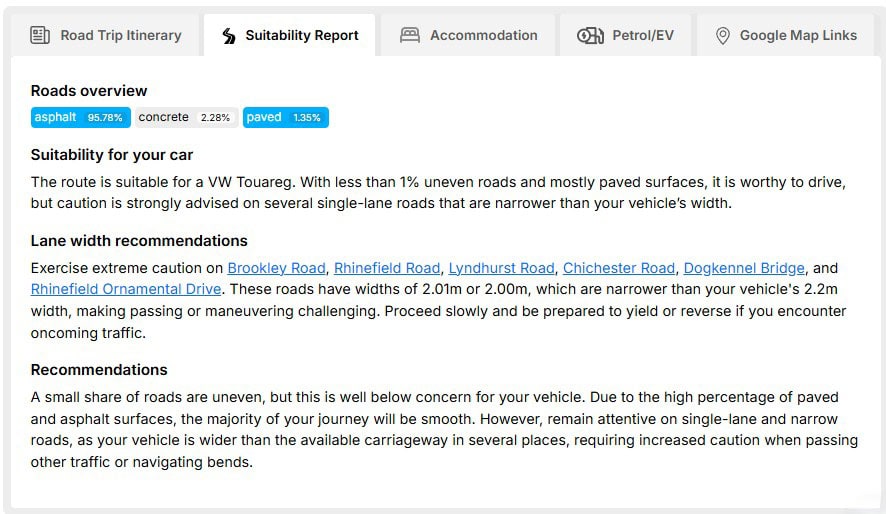
Not all roads suit all cars.
That is where the Suitability Report comes in. Based on the vehicle you have selected from My Garage, New Roads helps you review key route details such as road width, surface type, incline, traffic calming measures and clearance considerations where data is available.
That is especially useful if you’re planning on driving something low, wide, precious or just not built for rough lanes and tight village cut-throughs.
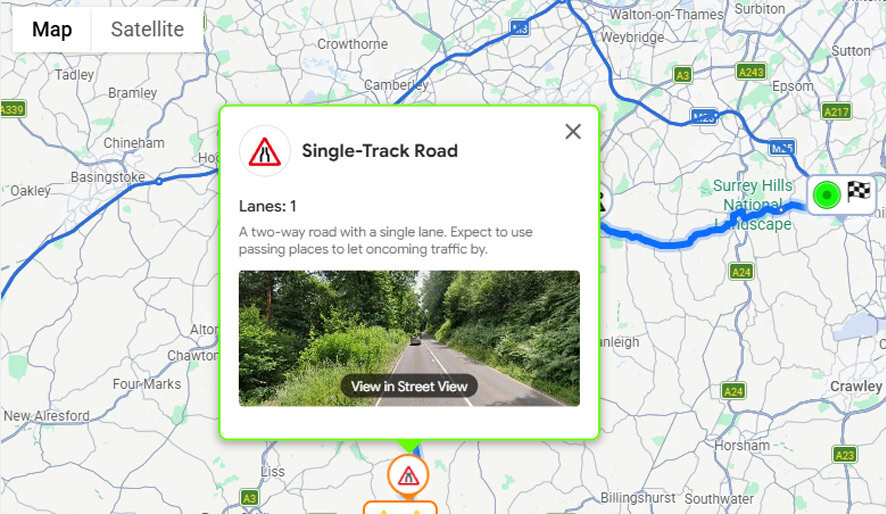
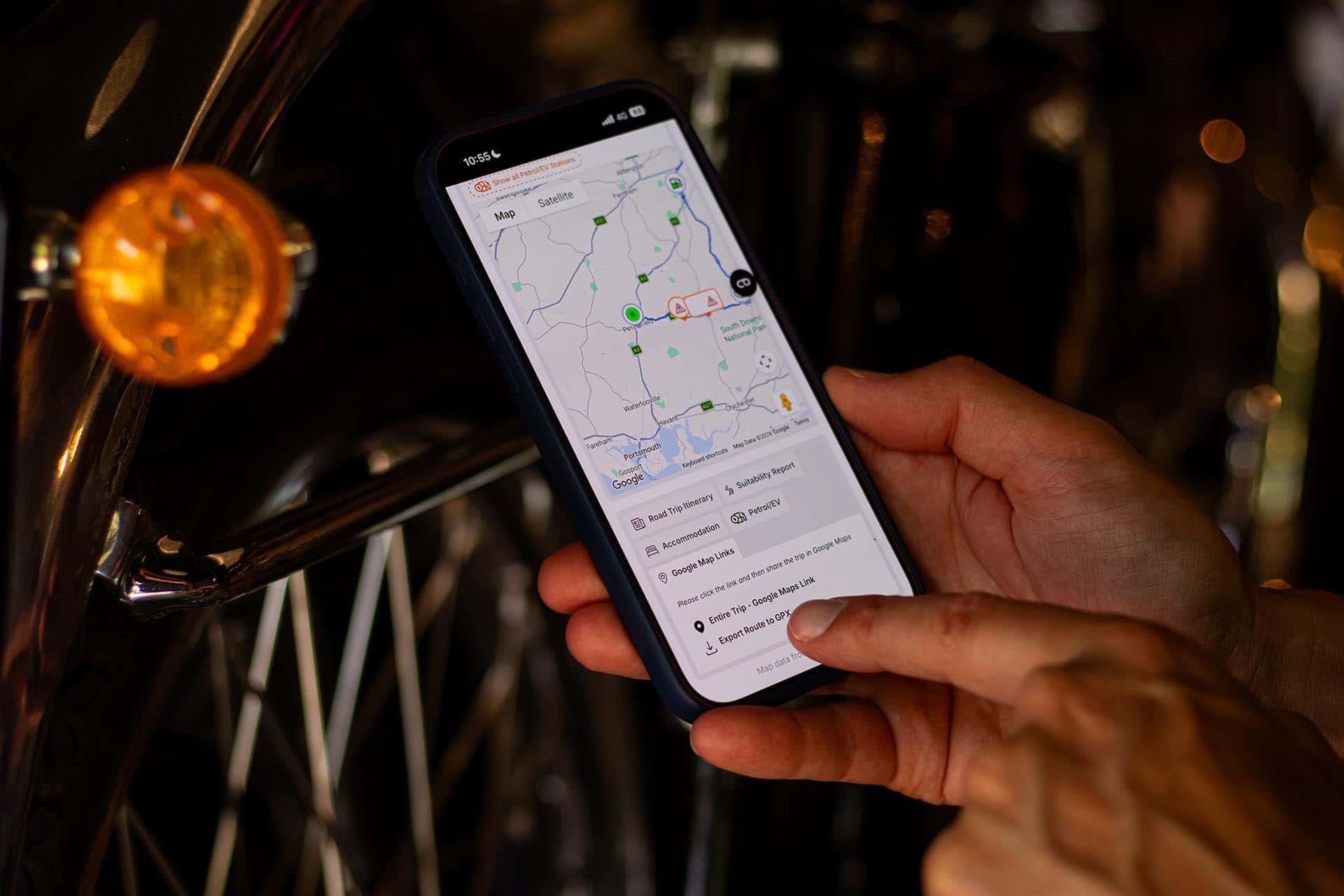
If the report flags a road that could be unsuitable, you can review where it appears on the route by clicking the warning symbols and use Streetview to review the section of road. If you would rather avoid it, go back to the chat and ask New Roads to rework that section.
It gives you more to work with before you set off, but it does not replace your own judgement. Always review the route and check important details before driving.
Accommodation Booking
Where you stay should feel like part of the trip, not just somewhere to sleep.
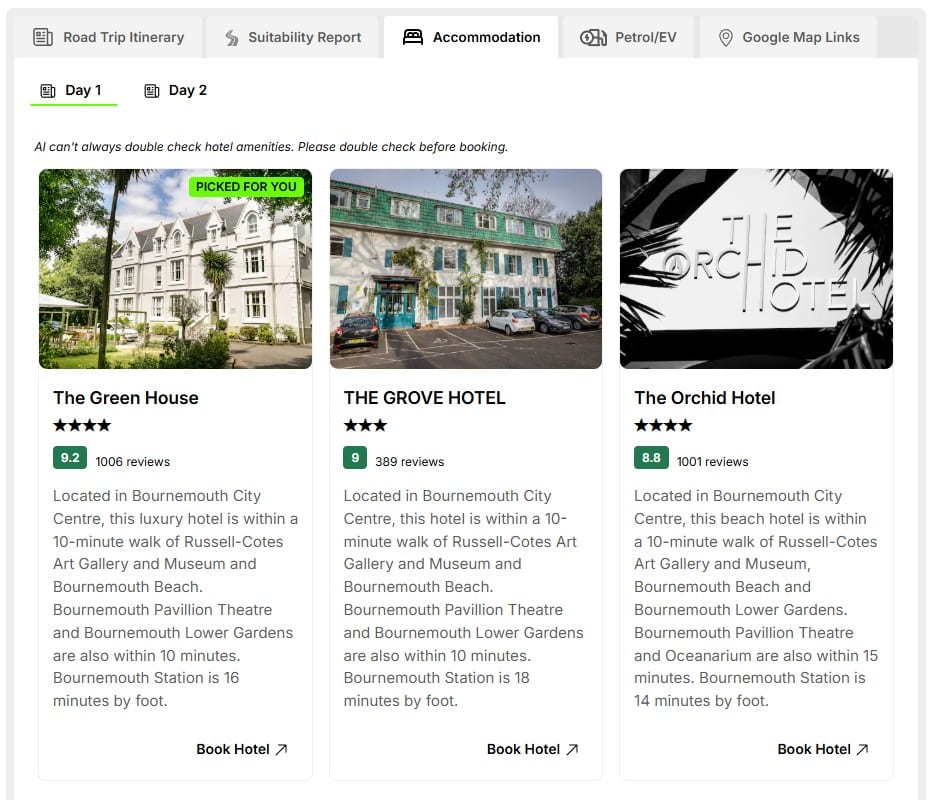
New Roads can suggest accommodation along your route, from countryside inns to smarter hotels and practical overnight stops. Suggestions are chosen around your route, location and traveller review data, helping you build a trip that feels joined-up from start to finish.
Want something different? Ask the chat to adjust your stays. You can make the plan more rural, more comfortable, more budget-friendly or closer to a specific stop.
When you find somewhere that suits, use the booking link to check the latest details and book directly with the provider. Always double check availability, parking, prices and booking terms before confirming.
At the moment, New Roads cannot confirm whether a hotel has secure parking. We know that matters, especially if you’re travelling in something special, and we’re working on improving it. For now, please check parking details directly with the hotel before you book.
If you book a different hotel from the one in your itinerary, go back to the chat and ask New Roads to update the trip. That way, your route starts and finishes in the right places when you export it.
Petrol & EV Stations
A good road trip should not turn into a panic search for fuel or charging.
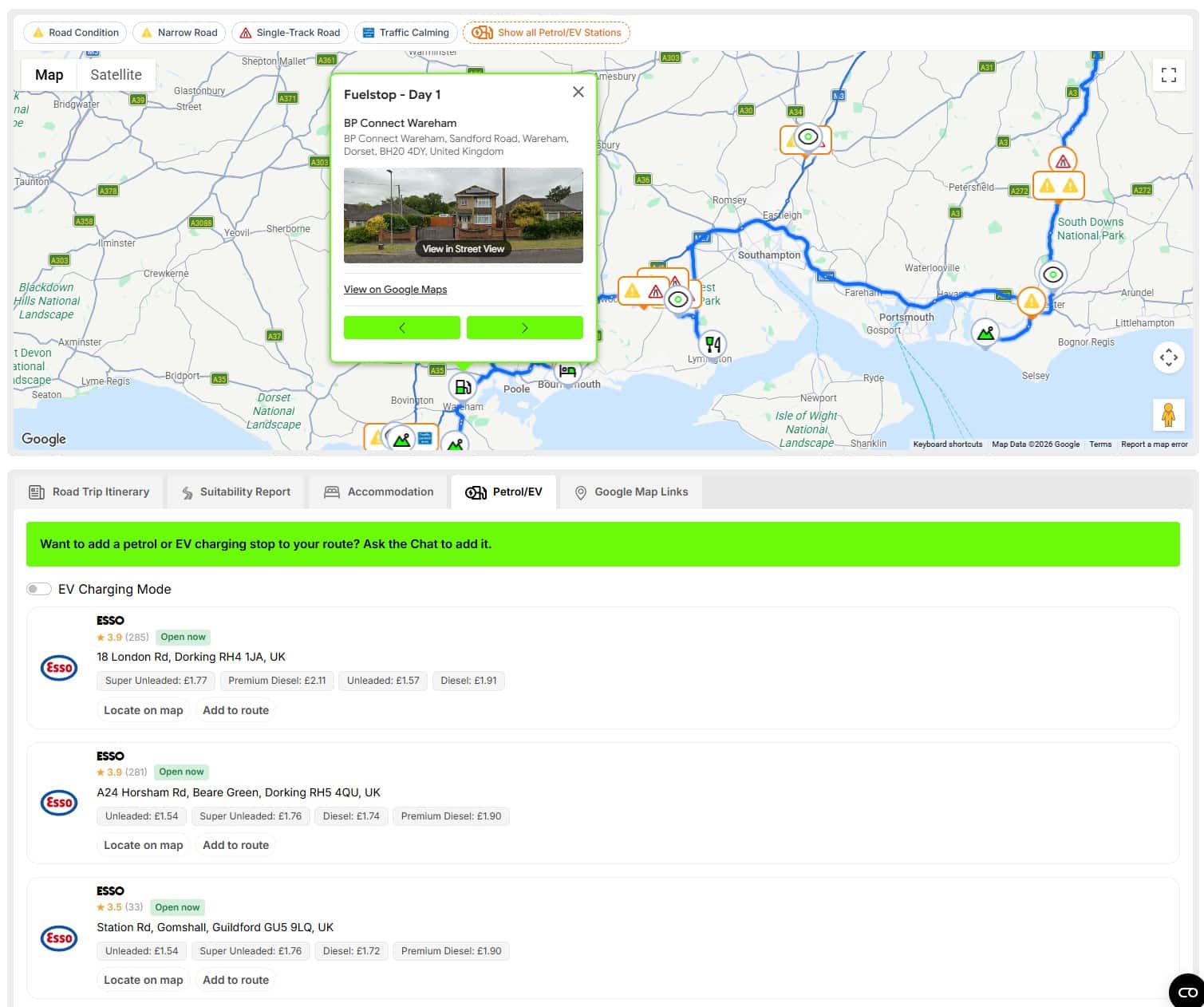
New Roads can show petrol stations and EV charging stops along your route, helping you keep the practical bits built into the plan. You can review possible stops, see useful station details where available and ask the chat to add one to your trip.
For petrol stations, the app may show details such as station brand, fuel types, pricing, opening status and reviews where available. That means you can look for the right stop before you need it, whether you’re after unleaded, super unleaded or somewhere with decent feedback from other drivers.
For EV stops, New Roads can help bring charging into the route planning process without turning the whole trip into a spreadsheet. Where supported, it can show charger types and whether chargers are currently available or in use, helping you spot more practical options along the way.
In map view, you can also toggle petrol and EV stations along your route for easy viewing. Tap into a stop, check where it sits and use Street View to get a better feel for the location before you rely on it.
Fuel prices, charger availability, opening hours, access, reviews and compatibility can change, so always check the important details before you set off or depend on a stop.
Less panic near empty. More time enjoying the drive.
Google Maps Route Export
Plan in New Roads. Drive with tools you already know.
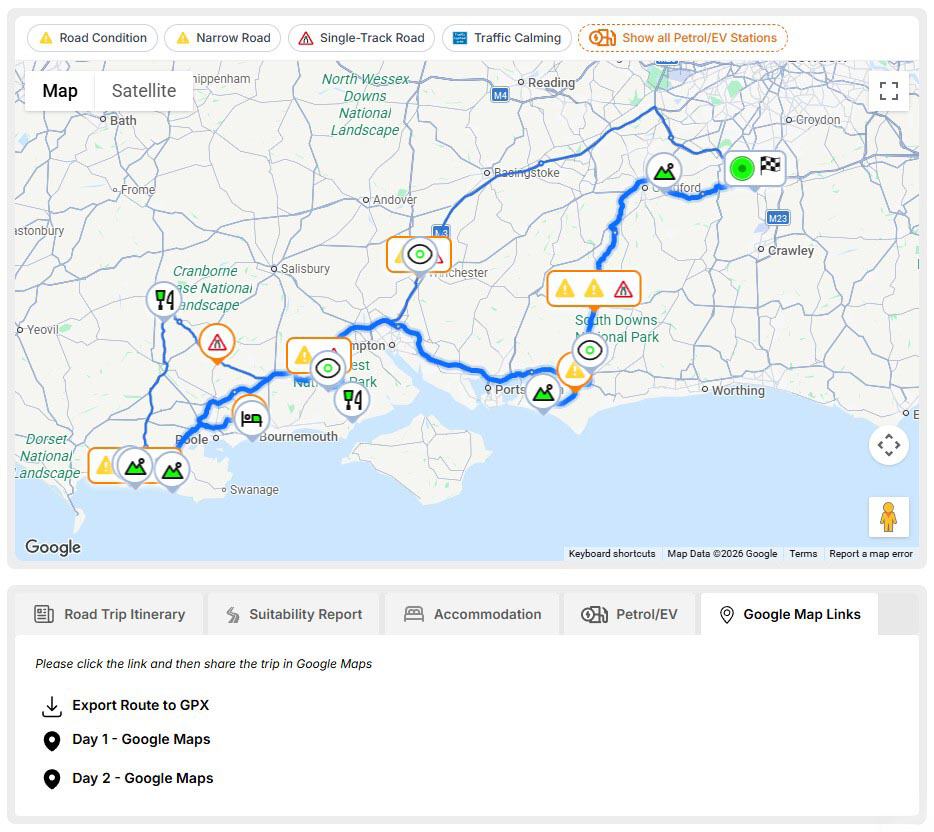
Once your trip is built, you can open the route in Google Maps and use it on your phone or in your car’s navigation system where supported. The in-app preview lets you inspect the route before you drive, zoom into key sections and use Google Maps tools such as Street View to get a better feel for the roads ahead.
Want to check a narrow lane, a turning point or where a stop actually sits? Take a look before you set off.
When you’re ready, export the trip to Google Maps and follow the route from there. If you’re not used to driving with multi-stop routes, keep an eye on the stop order as you go. When you reach a pit stop, waypoint or passing point, you may need to tap the ‘Next stop’ button in Google Maps so the route carries on properly.
As with any navigation tool, review the route carefully before driving and pay attention to prompts, stop order and any changes made by Google Maps during navigation.
GPX Export
Prefer using your own sat nav, bike computer or compatible navigation device?
New Roads supports GPX export so you can take your planned route into tools and systems that support GPX files. It is useful if you like to plan the trip properly first, then drive it using the setup you already trust.
Routing can vary depending on the device, app or platform you use, so check the GPX file after importing it and make sure the route still follows the roads you want.
My Trips
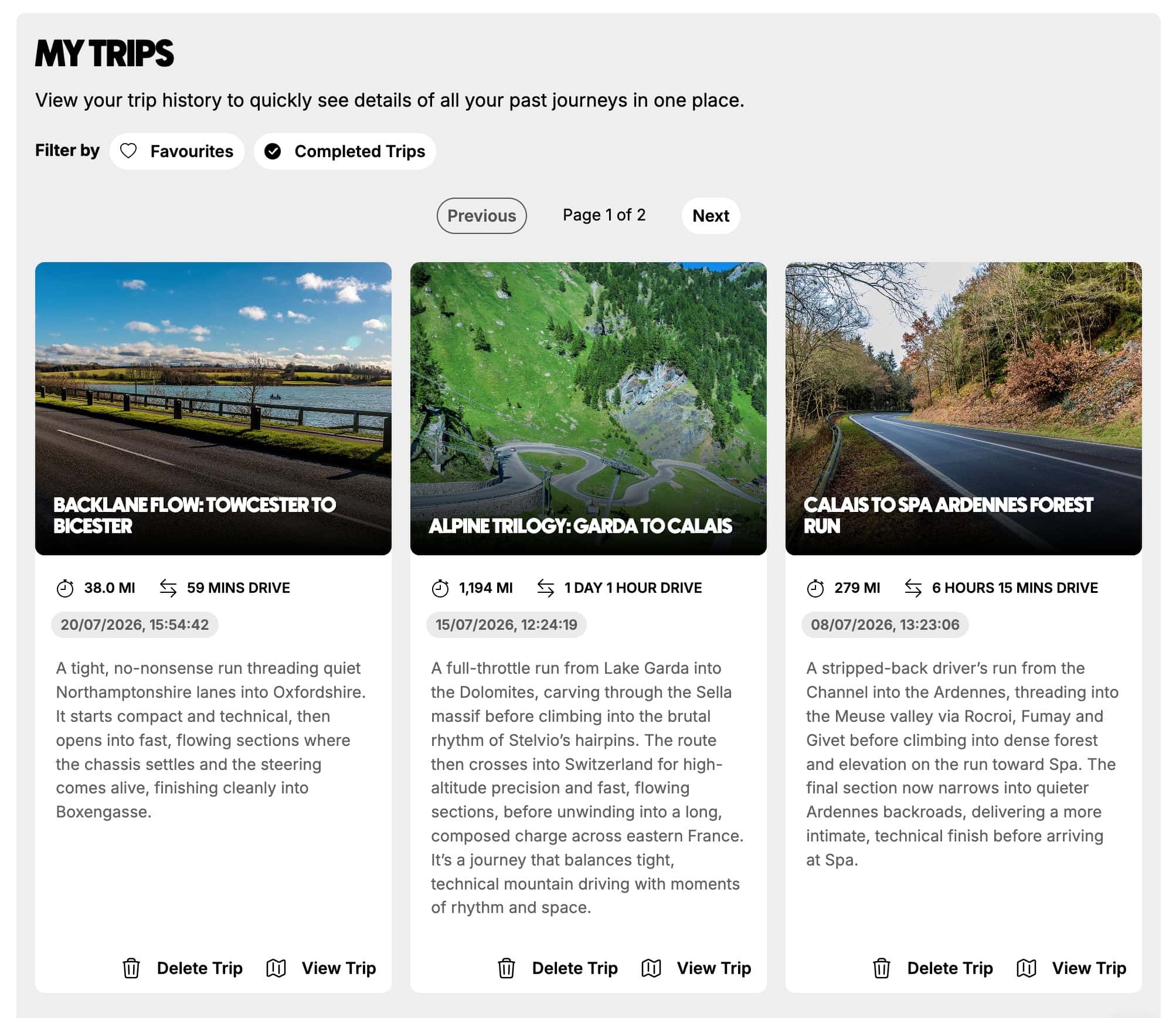
My Trips is where your road trips live.
Every journey you create can be saved to your account, ready to revisit, revise, share or drive later. Open a trip and you’ll find the itinerary, mapped route, key stops, accommodation suggestions, petrol or EV stops where supported and your Suitability Report.
After a drive, you can rate the trip, like it, leave feedback, upload photos and share the best section of road. It is a simple way to remember what worked, what you’d change next time and which stretches are worth coming back to.
Need to change something? Go back to the chat and tweak it. Want to drive it? Open the export link and load the route into Google Maps or use GPX where supported.
Premium subscribers can also share itineraries with other premium subscribers, making it easier to plan and review a group drive before everyone sets off. Each driver should still check the route, stop order and Suitability Report before travelling.
Whether it is next weekend, next year or a drive you want to do again, your trips are kept in one place and ready when you are.
Inspiration guides
Not sure where to go next?
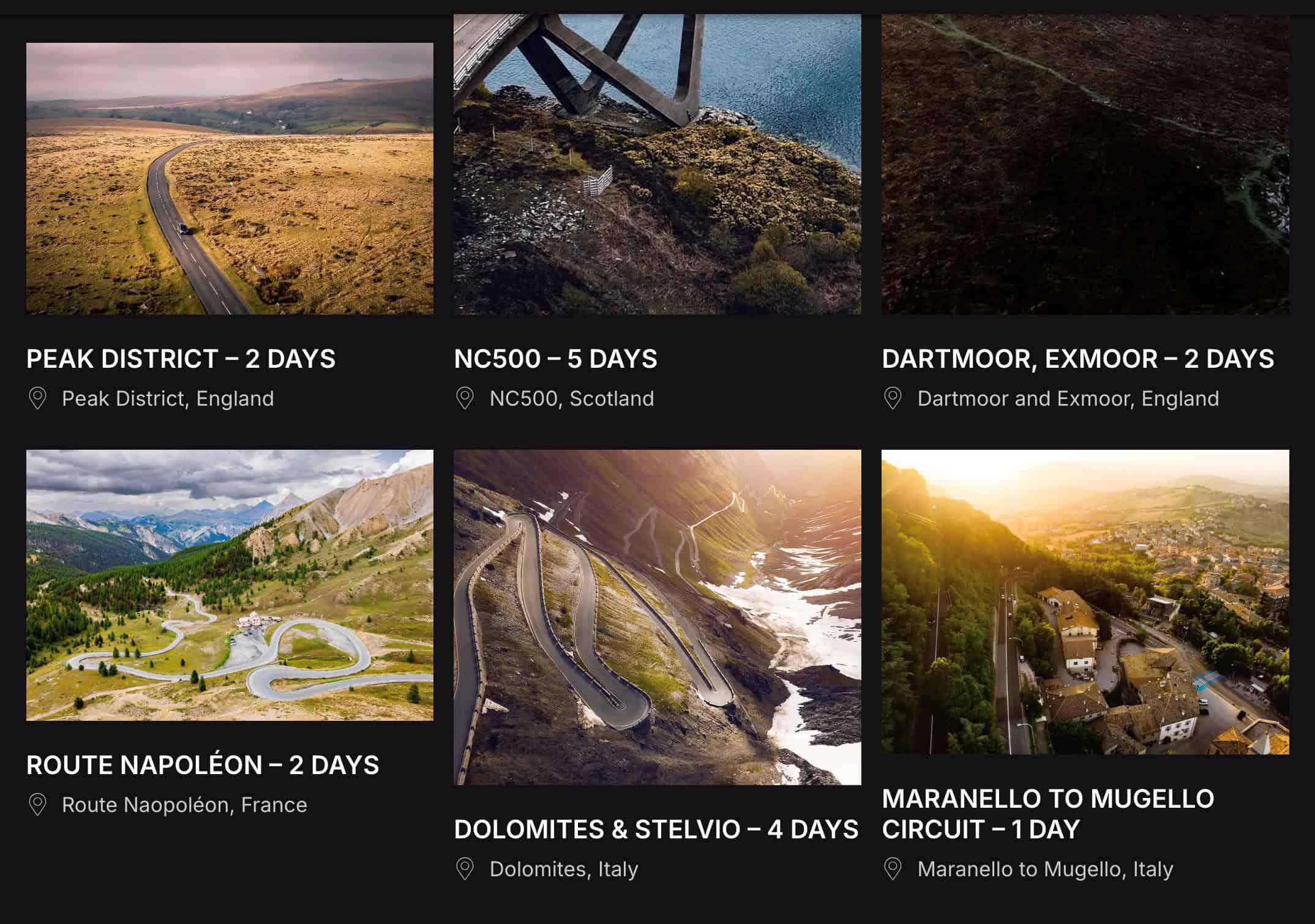
Inspiration guides give you a starting point. Browse ready-made drive ideas, route examples and trip inspiration based on some of our favourite drives, then load a guide into your account and make it your own.
You might start with a day drive through Surrey, a Lake District long weekend or a five-day trip through the Alps. From there, ask the chat to adjust the trip around your car, time, stops, accommodation style or preferred type of road.
Premium subscribers get access to all inspiration guides, giving you more routes to explore, adapt and save for later.
It is a simple way to see what New Roads can build – then shape it into the drive you actually want.
AI Road Trip Planner Pricing
New Roads is free to try.
Sign up for a free account and you’ll get 3 custom trips on us. We’d love to offer more for free, but behind the scenes New Roads uses AI and specialist data to build each trip – and those tools carry real costs.
If you want to keep planning, saving and driving more routes, you can upgrade to a Premium account with unlimited use for £9.99 a month, or save 20% with a one-off annual payment of £95.
That can be less than the cost of a tank of fuel – and a lot more useful when you’re trying to find roads worth driving.
Ready to go beyond the map?
Free
- 3 road trips
- Up to 25 prompts
- Save road trips
- Curate your garage
£9.99*
*£9.99 per month based on a 12 month auto-enrol subscription.
£95
*£9.99 per month based on a 12 month auto-enrol subscription.
- Unlimited road trips
- Unlimited prompts
- Share itineraries with other Premium users
- Access to Premium-only road trip guides
- Unlock partner benefits

FAQs
What makes New Roads different from a regular road trip planner app?
New Roads is an AI road trip planner app built by drivers, for drivers. While traditional apps focus on the quickest route from A to B, we prioritise the joy of the drive. Every journey is hyper-personalised – designed around your car, your preferences, and the kind of roads you actually want to be on.
How does the AI in your road trip planner app work?
Our AI asks the right questions up front – the kind a real driver would ask. It learns what you like, the car you drive and how you prefer to explore. Then it builds a full itinerary, from beautiful roads to curated stopovers, tailored precisely to you. The more you use it, the smarter it gets.
Can I use New Roads as a multi-day road trip planning app?
Absolutely. Whether it’s a one-day escape or a week-long adventure, our AI road trip planner app creates complete itineraries with overnight stays, scenic routes, and recommended dining or cultural stops – all designed to make the journey as rewarding as the destination.
Will it work for any type of car?
Yes – from hot hatches to grand tourers, the app adapts to your car’s character. Our route planning considers what you drive, so you avoid tedious A-roads or unsuitable terrain. Instead, you get roads that suit your style – whether you’re in a classic, a supercar, or something in between.
Do I need to book everything separately?
No stress, no spreadsheets. New Roads doesn’t just plot the route – it can include handpicked hotels, restaurants and experiences along the way. All curated for your trip, all in one place. It’s road trip planning without the hassle.
Can I launch the route straight into Google Maps or my sat nav?
Yes – once your trip is ready, you can export the full route directly into Google Maps for seamless navigation. Just tap and go. The planning disappears, and the journey takes over.